

Keeping months—or even years—of old Facebook chat history isn’t always ideal. But most of us end up storing these conversations without realizing it. Every time you log into Facebook, you might scroll through posts, hit the like button, share content, or reply to a message—but when was the last time you checked your chat history?
If you want a cleaner Messenger inbox, you can permanently remove Facebook chat messages. On desktop (Google Chrome), you can either delete chats individually or try using third-party plugins. Let’s walk through both options.
Delete Facebook Chat Messages Manually
Facebook provides a built-in option to remove conversations one by one. Here’s how:
- Open Facebook on your desktop browser and sign in.
- Click on Messenger (top-right corner of the page).
- Hover over any contact in the chat list.
- Click on the three horizontal dots (options menu).
- Select Delete.
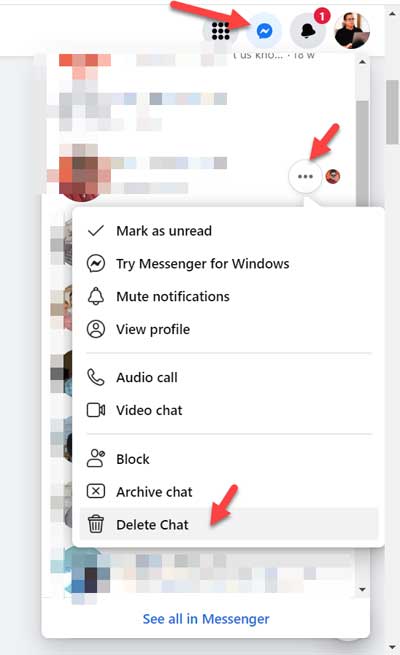
This will permanently delete the entire chat history with that person from your account only. Keep in mind, your friend will still have a copy of the messages unless they also delete them.
Delete All Facebook Chat History at Once (Chrome Plugin)
Unfortunately, Facebook doesn’t offer a built-in “delete all messages” feature. The only official method is to delete chats individually, as shown above.
However, some Chrome extensions claim to remove all your Facebook messages in one go. These can work, but they come with two major drawbacks:
- No guarantee: Plugins often stop working after Facebook updates its platform.
- Restrictions: Many extensions allow limited deletions unless you purchase a license key.
👉 Because of these issues, I don’t recommend relying on plugins. The most reliable approach is still the manual method, even if it takes a little extra time.
Things to Remember Before Deleting Messages
- Once you delete a chat, it’s gone from your account permanently.
- You cannot remove messages from the recipient’s inbox.
- Always think before sending sensitive or personal messages.
Frequently Asked Questions
Q1. Can I delete all Facebook messages at once without a plugin?
No. Facebook does not currently offer a built-in feature to delete all messages at once. You can only delete conversations individually.
Q2. If I delete a chat on Facebook, does it delete for the other person too?
No. Deleting a chat only removes it from your account. The other person will still see the conversation unless they also delete it.
Q3. Do Chrome plugins for deleting Facebook messages still work?
Some may work temporarily, but they are unreliable because Facebook updates its platform often. Many plugins also require a paid license for bulk deletion.
Q4. Can I recover deleted Facebook messages?
No. Once a message is permanently deleted from Messenger, you cannot recover it unless you downloaded a backup of your Facebook data beforehand.
Q5. What’s the safest way to clean up my Messenger inbox?
The safest way is to manually delete conversations one by one. While slower, it ensures security and avoids plugin risks.
Final Thoughts
If your Messenger inbox feels cluttered, take some time to delete chats you no longer need. While plugins may promise quick fixes, they’re unreliable in the long run. The safest way to clean your Facebook chat history is still the manual method—one chat at a time.
Related Resources
- How to Remove Multiple Tabs Opening on Chrome Start-Up
- How to Take Printout of Your Facebook News Feed Posts
- How to Preview All Images in One Place in Google Drive
- Change the Background Color of Web Pages on Chrome (Official Plugin)
- How to Compress PDF Files Without Losing Quality
- How to Send Emails to Multiple Recipients Privately
- 25 Popular Chat Short Words (Chat Slang) You May Love to Use

I want my messages to be permanently deleted. I have deleted the conversation but some say that they will be stored in backup and any one who is intelligent in software can see them. Is that possible, if yes then what can I do?
Please help me with this
i didnot get hte link to download facebook complete messages
[…] possibly, then can see your chat history on Facebook. Not good, right? I have recently shared the tips to completely remove Facebook chat history on the desktop browser. In this tutorial we can see how to remove the Facebook chat history on your […]