

When you go on a long road trip with friends, splitting fuel expenses fairly can quickly become confusing. Not everyone travels every leg of the journey, and some passengers may join or leave along the way. In such situations, splitting the fuel cost equally does not always feel fair.
To solve this problem, I created a Road Trip Fuel Cost Splitter in Google Sheets that automatically calculates each person’s fair share based on the distance they actually traveled in the vehicle.
A Fair Way to Split Fuel Costs
Instead of dividing fuel expenses equally, this template considers:
- The distance covered in each trip segment
- The number of passengers present during each segment
- The total fuel expense for the trip
This ensures that every traveler pays only for their actual share of the journey.
What the Template Generates
Once you enter the trip data, the template automatically creates a summary showing:
- Person
- Shared Distance (km) – total distance traveled while the person was in the vehicle
- Fuel Share Distance (km) – trip-segment distance divided by the number of travelers in that segment
- Fuel Cost Share – the final fuel amount each person needs to pay
All calculations update instantly using a single dynamic array formula.
Download the Template
You can copy the free Road Trip Fuel Cost Splitter in Google Sheets template using the link below:
How to Use the Road Trip Fuel Cost Splitter in Google Sheets
Using the template is simple and takes only a few minutes.
Start by entering the total fuel expense next to the Fuel Cost label (cell I2). This should be the total of all fuel bills for the trip.
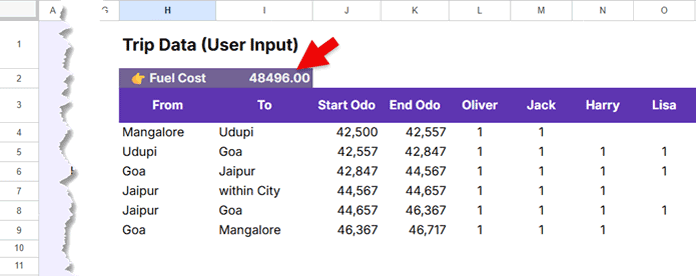
Next, enter the names of all travelers in row 3 starting from column L. You can replace the sample names with your own travelers and add more people if required.
Then, enter the trip details from row 4 onwards:
- From and To locations
- Start and End odometer readings
- Passenger availability for each trip segment using:
1= Present- Blank = Not Present
That’s it. The template handles all calculations automatically.
Example Trip Scenario
To understand how the Road Trip Fuel Cost Splitter in Google Sheets works, imagine four friends — Oliver, Jack, Harry, and Lisa — traveling from Mangalore to Jaipur and back.
Along the way, passengers join and leave at different locations. For example, Harry and Lisa join the trip from Udupi onwards, while Lisa skips the Jaipur city drive and the final leg back to Mangalore.
| From | To | Start Odo | End Odo | Oliver | Jack | Harry | Lisa |
|---|---|---|---|---|---|---|---|
| Mangalore | Udupi | 42,500 | 42,557 | 1 | 1 | ||
| Udupi | Goa | 42,557 | 42,847 | 1 | 1 | 1 | 1 |
| Goa | Jaipur | 42,847 | 44,567 | 1 | 1 | 1 | 1 |
| Jaipur | Within City | 44,567 | 44,657 | 1 | 1 | 1 | |
| Jaipur | Goa | 44,657 | 46,367 | 1 | 1 | 1 | 1 |
| Goa | Mangalore | 46,367 | 46,717 | 1 | 1 | 1 |
Note: For each new trip segment, the starting odometer reading should match the ending odometer reading of the previous segment.
Instead of manually calculating fuel expenses for all 4,217 kilometers of travel, the template tracks each trip segment automatically and generates a fair fuel cost split for every traveler.
Example Result
If the total fuel expense is 48,496, the template generates the following result:
| Person | Shared Distance (km) | Fuel Share Distance (km) | Fuel Cost Share |
|---|---|---|---|
| Oliver | 4,217 | 1,105.17 | 12,709.55 |
| Jack | 4,217 | 1,105.17 | 12,709.55 |
| Harry | 4,160 | 1,076.67 | 12,381.79 |
| Lisa | 3,720 | 930.00 | 10,695.11 |
How the Formula Works
All calculations are powered by a single dynamic array formula placed in the summary section. The formula automatically:
- Calculates the distance for each trip segment
- Adjusts the split based on the number of passengers in the vehicle
- Allocates the fuel expense proportionally
Want to learn how the underlying math works? Check out my step-by-step tutorial on how to build the road trip fuel cost splitter formula from scratch.
Final Thoughts
This Road Trip Fuel Cost Splitter in Google Sheets makes group travel expense sharing much more transparent and accurate. Instead of manually calculating or estimating fuel shares, you can simply enter your trip details and let the template handle everything automatically.
Related Google Sheets Templates
- Array Formula to Split Group Expenses in Google Sheets
- Carpool Cost Splitter & Rotation Tracker in Google Sheets (Free Template)
For more free yet powerful spreadsheet tools, see: Free Google Sheets Templates (Premium & Fully Automated)
