
Want to create zigzag numbering in Google Sheets for a board game, numbered grid, or custom layout? In this tutorial, you will learn two easy formula methods to generate a snake-style numbering pattern automatically.
You can create zigzag numbering in Google Sheets using the MAKEARRAY function. You can also use array manipulation with FILTER, SEQUENCE, and SORT. We will cover both methods below.
What Is Zigzag Numbering?
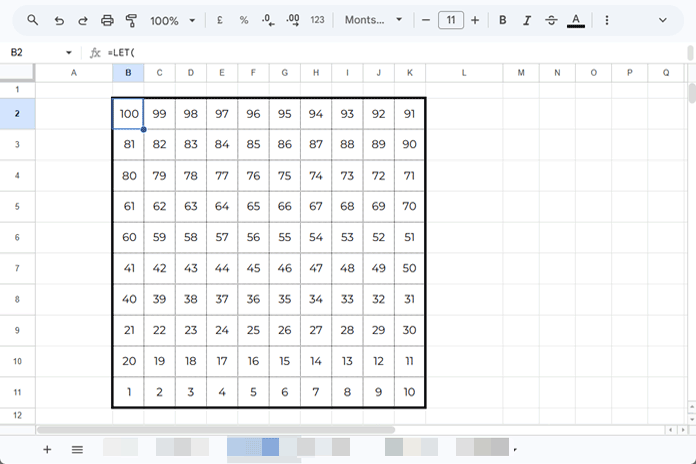
Zigzag numbering is a snake-like pattern, also known as Boustrophedon numbering, where every alternate row is reversed horizontally.
Example:

This numbering style can run from top to bottom or bottom to top.
Formula to Create Zigzag Numbering in Google Sheets
Use the formula below to generate zigzag numbering in Google Sheets:
=LET(
 rows, A1,
 cols, B1,
 start, C1,
 MAKEARRAY(rows, cols, LAMBDA(r, c,
   LET(
     b, r,
     base, (b-1)*cols,
     IF(ISODD(b), base+c+start-1, base+cols+1-c+start-1)
   )
 ))
)
How to Use the Formula
Assume you want a 10 × 10 zigzag grid (numbers 1 to 100):
- Enter 10 in cell A1 (rows)
- Enter 10 in cell B1 (columns)
- Enter 1 in cell C1 (starting number)
Then enter the formula above.
Hardcoded Version of the Formula
You can also directly insert fixed values:
=LET(
 rows, 10,
 cols, 10,
 start, 1,
 MAKEARRAY(rows, cols, LAMBDA(r, c,
   LET(
     b, r,
     base, (b-1)*cols,
     IF(ISODD(b), base+c+start-1, base+cols+1-c+start-1)
   )
 ))
)
Reverse Zigzag Numbering in Google Sheets
To create reverse zigzag numbering in Google Sheets (bottom to top), replace:
b, rwith:
b, rows+1-rThis reverses the row direction while keeping the zigzag pattern.
Features of This Zigzag Numbering Formula
This dynamic formula offers several benefits:
- Creates zigzag numbering in any grid size
- Works with square grids such as 10 × 10 or 5 × 5
- Works with rectangular grids such as 10 × 5 or 5 × 10
- Allows a custom starting number
- Supports reverse zigzag numbering
Formula Explanation
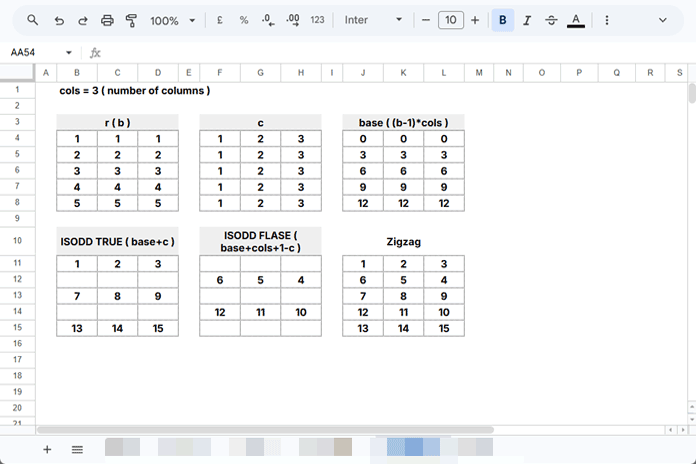
To understand the logic, let’s use a 5 × 3 grid.
The MAKEARRAY function builds an array using row numbers (r) and column numbers (c).
The variable:
b, rstores the row number.
The base value is:
(b-1)*colsThis calculates the starting offset for each row.
The main zigzag logic is:
IF(ISODD(b), base+c+start-1, base+cols+1-c+start-1)If the row is odd:
Numbers move left to right
If the row is even:
Numbers move right to left
That creates the zigzag numbering pattern.
Alternative Formula for Zigzag Numbering in Google Sheets
Instead of MAKEARRAY, use this method:
=LET(
  rows, A1,
  cols, B1,
  start, C1,
  seq, SEQUENCE(rows, cols, start),
  o, FILTER(seq, ISODD(SEQUENCE(rows))),
  e, FILTER(seq, ISEVEN(SEQUENCE(rows))),
  flipEh, CHOOSECOLS(e, SEQUENCE(cols, 1, cols, -1)),
  SORT(VSTACK(o, flipEh))
)
This formula:
- Creates a number sequence
- Separates odd and even rows
- Reverses even rows
- Combines everything into a zigzag pattern
Reverse Version of Alternative Formula
=LET(
  rows, A1,
  cols, B1,
  start, C1,
  seq, SEQUENCE(rows, cols, start),
  o, FILTER(seq, ISODD(SEQUENCE(rows))),
  e, FILTER(seq, ISEVEN(SEQUENCE(rows))),
  flipEh, CHOOSECOLS(e, SEQUENCE(cols, 1, cols, -1)),
  CHOOSEROWS(SORT(VSTACK(o, flipEh)), SEQUENCE(rows, 1, rows, -1))
)
Conclusion
Now you know two easy ways to create zigzag numbering in Google Sheets. I recommend the MAKEARRAY version because it is cleaner, faster, and easier to customize.
This technique is especially useful for:
- Board game layouts
- Seating charts
- Learning worksheets
- Number puzzles
- Custom grids
If you need a snake-style numbering pattern, this is one of the best formula solutions in Google Sheets.
FAQ
How do I create zigzag numbering in Google Sheets?
Use the MAKEARRAY formula with IF and ISODD to reverse alternate rows automatically.
Can I create reverse zigzag numbering?
Yes. Replace b, r with b, rows+1-r.
Can I use this on rectangular grids?
Yes. It works on grids like 10 × 5, 5 × 10, or any custom size.
What is another name for zigzag numbering?
It is also called Boustrophedon numbering or snake numbering.