















Floyd’s Triangle is a sequential arrangement of natural numbers where each row contains one more number than the row above it. Starting with 1 at the top, the numbers continue in order, forming a triangle that grows row by row.
For example, the first few rows look like this:
1
2 3
4 5 6
7 8 9 10
This pattern is visually appealing and commonly used in mathematics and programming exercises. In this tutorial, you’ll learn how to generate Floyd’s Triangle automatically in Google Sheets using a single, dynamic formula. Once set up, the triangle expands automatically, allowing you to create sequences of any size without manually entering numbers.
What Is the Formula for Floyd’s Triangle in Google Sheets?
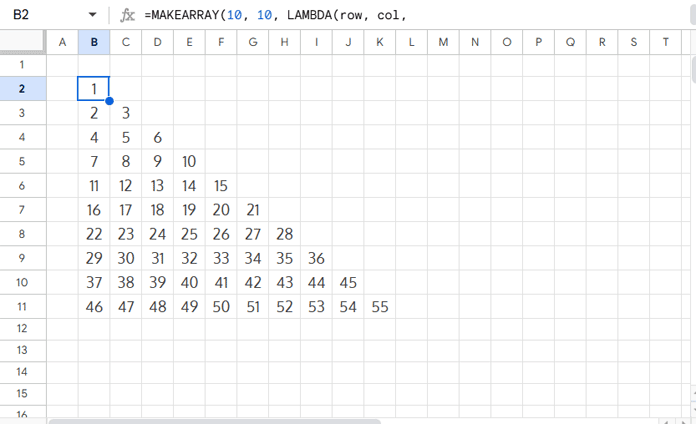
To create a 10-row Floyd’s Triangle, enter the following formula in any empty cell (for example, B2):
=MAKEARRAY(10, 10, LAMBDA(row, col,
    LET(
        previous, IFERROR(SUM(SEQUENCE(row - 1)), 0),
        current, previous + col,
        IF(col <= row, current,)
    )
))
Result:
1
2   3
4   5   6
7   8   9   10
11  12  13  14  15
16  17  18  19  20  21
22  23  24  25  26  27  28
29  30  31  32  33  34  35  36
37  38  39  40  41  42  43  44  45
46  47  48  49  50  51  52  53  54  55
Tip: You can replace the 10 in the formula with any number to create a triangle of your desired size.
How Does the Floyd’s Triangle Formula Work?
Here’s a step-by-step breakdown of how the formula works:
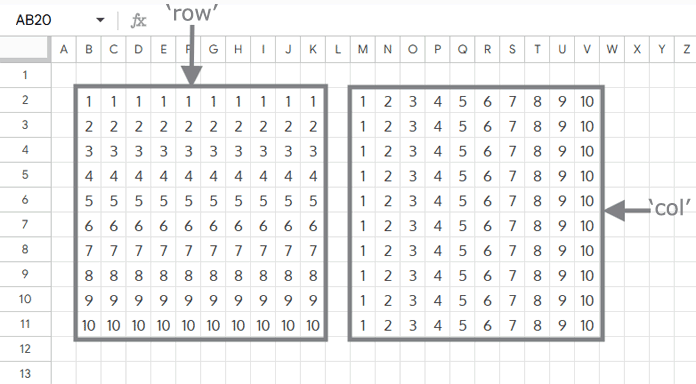
Step 1: MAKEARRAY(10, 10, LAMBDA(row, col, …))
This creates a 10×10 grid in Google Sheets, where each cell is calculated using the row and column numbers.
Step 2: previous, IFERROR(SUM(SEQUENCE(row - 1)), 0)
This part calculates the sum of all numbers in the previous rows to determine the starting number for the current row.

Step 3: current, previous + col
Here the column number is added to the previous total, which gives the correct number for the current cell.
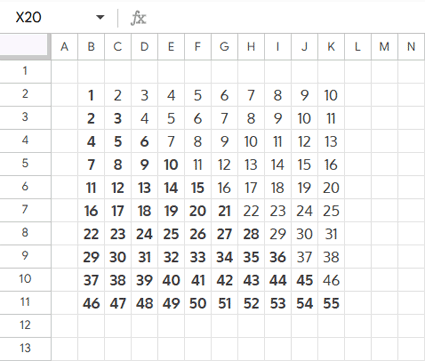
Step 4: IF(col <= row, current,)
Finally, this condition ensures that only the numbers belonging to the triangle appear in each row, while extra cells remain empty.
How Can You Customize Floyd’s Triangle in Google Sheets?
You can customize Floyd’s Triangle in several ways to fit your needs:
Change the triangle size: Adjust the MAKEARRAY formula by replacing 10 with any number of rows you want, such as 5, 15, or more.
Use letters or custom values: Instead of numbers, you can map the triangle to letters, words, or other sequences. To do this, arrange your values in a column with sequential numbers beside them. Then, use the triangle’s numbers as lookup values, the sequential numbers as the lookup range, and your text list (letters, fruits, etc.) as the return range with functions like XLOOKUP.
Apply formatting: Enhance readability by adding borders, colors, or bold text so the triangular pattern stands out clearly.
Floyd’s Triangle is a fun way to explore patterns in Google Sheets. With this formula, you can create and customize it in just a few clicks.
