

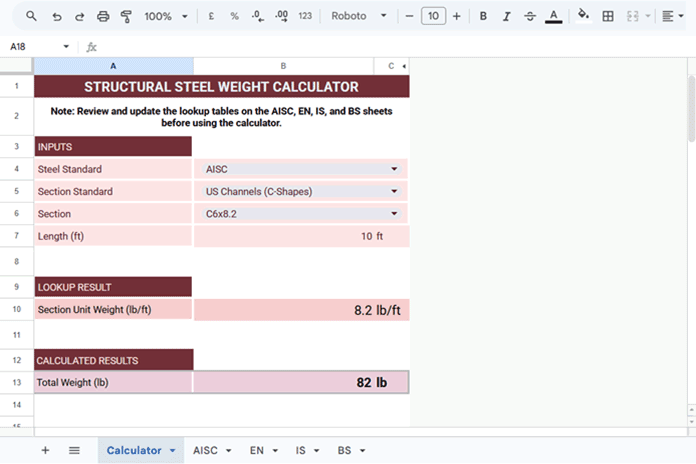
Below is a Structural Steel Weight Calculator template built entirely in Google Sheets. I used an earlier version of this calculator to estimate the weight of structural steel works for billing purposes. This version has been redesigned as a reusable template.
The template includes sample lookup tables for AISC (USA), EN (European Union), IS (India), and BS (United Kingdom). Each lookup table is stored on a separate sheet. You can review, edit, or replace the sample data with the section designations and unit weights used by your organization or regional standard.
Who Can Use This Template?
This template is useful for estimators, fabricators, engineers, and students. It calculates the total weight of a structural steel member from its unit weight and length.
You may already have a printed steel section handbook or an electronic reference. Even then, looking up the unit weight and calculating the total weight for every member can take time. This template automates the lookup and calculation, making the process quicker and more consistent.
Download the Template
Click the button below to copy the template, then continue to the next section to learn how to use it.
Template Features
- Supports Multiple Steel Standards – Includes sample lookup tables for AISC (USA), BS (United Kingdom), IS (India), and EN (European Union).
- Dependent Drop-Down Lists – The available Section Standards and Sections update automatically based on the selected steel standard.
- Automatic Unit Switching – Labels and calculations automatically switch between kg/m and lb/ft, and between kg and lb, depending on the selected standard.
- Customizable Lookup Tables – Review, edit, or replace the sample section designations and unit weights to match your company’s or regional standard.
How to Use the Structural Steel Weight Calculator Template
Before using this template: Review the lookup tables on the AISC, EN, IS, and BS sheets. The included section designations, unit weights, and standards are provided as sample data. Update or replace them as needed to match the structural steel standard used by your organization or region. Note that the AISC lookup table uses lb/ft, whereas the EN, IS, and BS lookup tables use kg/m. If you modify the unit weights, keep these units unchanged to ensure accurate calculations.
The calculator requires the following inputs:
- Steel Standard – Select a structural steel standard from the drop-down list in the merged range B4:C4. The template currently includes AISC (USA), EN (European Union), IS (India), and BS (United Kingdom).
- Section Standard – Select the applicable section standard from the drop-down list in the merged range B5:C5. The available options depend on the selected steel standard.
- Section – Select the required structural steel section from the drop-down list in the merged range B6:C6. The available profiles depend on the selected standard.
- Length – Enter the structural steel member length in cell B7. Refer to the unit displayed in cell C7 before entering the value.
After you provide these inputs, the template automatically returns the section unit weight and calculates the total weight.
Note: To perform another calculation, press Delete after selecting the merged cells B4:C6. Then clear the value in cell B7. Do not delete the formula in cell C7, as it automatically displays the required length unit.
Frequently Asked Questions
How do I change the weight unit (lb, kg, etc.)?
Use the CONVERT function to convert the calculated weight to another unit.
To convert kilograms to pounds:
=IFERROR(CONVERT(B13, "kg", "lbm"))To convert pounds to kilograms:
=IFERROR(CONVERT(B13, "lbm", "kg"))Which steel standards does this template support?
The template currently includes sample lookup tables for the following structural steel standards:
- AISC (USA)
- EN (European Union)
- IS (India)
- BS (United Kingdom)
Should I verify the unit weights in the lookup tables?
Yes. The lookup tables contain sample data for the supported standards. Although the values have been compiled from published references, you should verify them before using the template. Update the tables as needed to match the structural steel standard used by your organization or region.
Conclusion
I hope this template helps you calculate structural steel weights more quickly in Google Sheets. You only need to update the four data sheets used by the calculator. The formulas and calculations update automatically.
If you have suggestions for improving the template or would like support for additional structural steel standards such as JIS, CSA, or others, let me know in the comments. I’ll be happy to consider them for future updates.
