

Keeping up with home maintenance can be challenging, especially when you need to track recurring tasks, maintenance expenses, and appliance warranties. To make the process easier, I created a Home Maintenance Tracker Template for Google Sheets that helps homeowners stay organized and avoid costly repairs.
This free template allows you to manage maintenance schedules, record expenses, and track warranties—all from a single Google Sheets file that you can access from any device.
Features of the Home Maintenance Tracker Template for Google Sheets
- Free to copy and use.
- Built in Google Sheets, so you can access it anywhere with an internet connection.
- Track maintenance schedules, expenses, and warranties in one place.
- Advanced highlighting rules to instantly identify upcoming or overdue maintenance tasks.
- Automatic expense summaries by category, including planned and actual costs.
- Uses structured tables and smart array formulas for easy data management.
Copy the Home Maintenance Tracker Template
Click the button below to make your own copy of the Home Maintenance Tracker Template for Google Sheets and start tracking maintenance schedules, expenses, and warranties.
Copy Home Maintenance Tracker Template
How to Use the Home Maintenance Tracker Template
The template contains four sheet tabs:
- Maintenance Log – Schedule maintenance tasks and monitor upcoming work.
- Expenses – Record planned and actual maintenance expenses.
- Warranty Tracking – Track warranty details for appliances and building materials.
- Lists – Manage the lists used in dropdown menus throughout the template.
Let’s explore each sheet.
1. Lists Sheet
The Lists tab contains two tables:
- Maintenance Log List
- Expense Category List
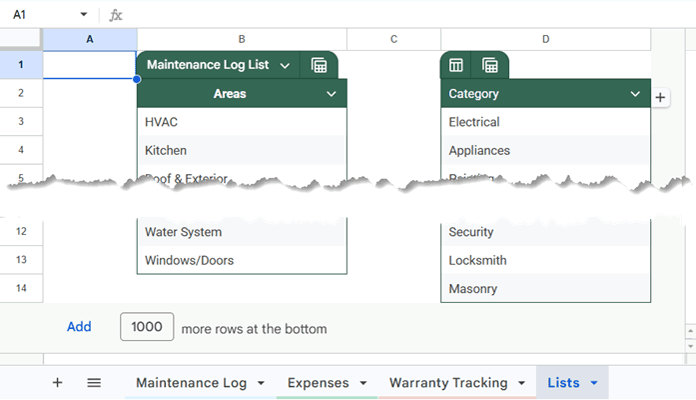
Maintenance Log List
This table stores the values used in the dropdown menus within the Maintenance Log sheet.
Under Areas, enter the sections of your home that require maintenance attention. Sample entries include:
- HVAC
- Kitchen
- Roof & Exterior
You can modify these entries or add your own categories.
Expense Category List
Use this table to maintain your expense categories.
You can:
- Keep the existing categories.
- Modify them to suit your needs.
- Add additional categories as required.
2. Maintenance Log Sheet
The Maintenance Log is the core component of the Home Maintenance Tracker Template for Google Sheets.
Table Structure
| Area | Task | Frequency | Last Done | Next Due | Priority | Notes |
|---|
Before using the template, delete the sample data included in the table. Make sure to clear the data in columns C to F and H to I. Do not delete any rows, as doing so may break the formulas or conditional formatting rules in the sheet.
How to Enter Maintenance Records
- Select an area from the dropdown list.
- Enter the maintenance task.
- Select the maintenance frequency. Use only the predefined frequencies—15 Days, Monthly, 3 Months, 6 Months, Annually, 1.5 Years, and 2 Years—as these values are referenced by the formulas in the sheet. Modifying or replacing them may cause the formulas to work incorrectly.
- Enter the date when the task was last completed.
- The Next Due date will be calculated automatically.
- Select the task priority—High, Medium, or Low. You can modify these dropdown options if needed, as they are used only for reference and filtering purposes.
- Add notes if necessary.
Maintenance Highlight Options
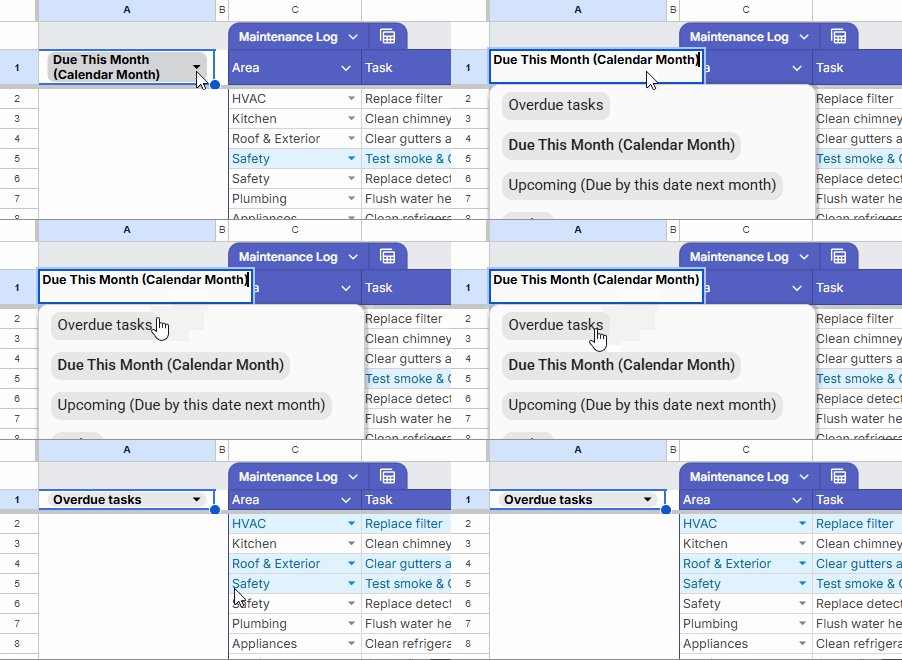
A dropdown menu at the top-left corner allows you to highlight specific maintenance tasks.
Available options include:
- Overdue Tasks
- Due This Month (Calendar Month)
- Upcoming (Due by this date next month)
- Due Today
This makes it easy to identify tasks that require immediate attention.
3. Expenses Sheet
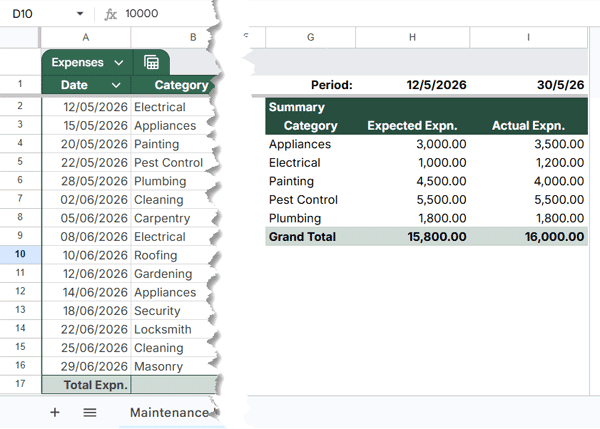
The Expenses sheet is optional but highly useful if you want to track maintenance-related costs. Before using it, delete the sample data in columns A to E.
Table Structure
| Date | Category | Description | Expected Expense | Actual Expense |
How to Use
- Enter the expense date.
- Select a category.
- Add a description.
- Enter the expected expense amount.
- Once the expense is incurred, enter the actual amount.
Expense Summary
A category-wise expense summary is automatically generated on the right side of the sheet.
You can customize the reporting period by entering:
- Start Date in cell H1
- End Date in cell I1
The summary will update automatically for the selected date range.
4. Warranty Tracking Sheet
The Warranty Tracking sheet helps you manage warranty information for:
- Home appliances
- Construction materials
- Home improvement products
Examples include:
- Television
- Washing Machine
- Water Purifier
- Roofing Materials
- Waterproofing Systems
Table Structure
| Item/Component | Type | Purchase Date | Warranty Period (Years) | Expiry Date | Vendor/Brand | Contact Number | Policy/Invoice Link |
How to Use
First, delete the sample data in columns A to D and F to H.
Then:
- Enter the item or component name.
- Select the type.
- Enter the purchase date.
- Enter the warranty period in years.
- The expiry date will be calculated automatically.
- Enter the vendor or brand name.
- Add the contact number.
- Include a link to the invoice or warranty document.
Expired warranties are automatically highlighted for quick identification.
Important Notes
This template uses structured tables and conditional formatting rules extensively.
To avoid breaking formulas and formatting:
- Do not copy and paste over existing table structures.
- You can safely add rows.
- When adding new rows, hover over a table cell and use the + button to extend the table.
Following these steps ensures that formulas, dropdowns, and conditional formatting continue to work correctly.
Why Use a Home Maintenance Tracker?
Building or buying a home requires a significant investment. Regular maintenance helps preserve its value, prevent expensive repairs, and extend the life of appliances and building materials.
This Home Maintenance Tracker Template for Google Sheets provides a simple and systematic way to manage maintenance schedules, monitor expenses, and keep track of warranties—all in one place.
If you have suggestions for improving the template, feel free to share them.
For more free and automated spreadsheet tools, explore my collection of Free Google Sheets Templates (Premium & Fully Automated).
