

Looking for a Google Sheets Sudoku template that goes beyond static puzzle grids? This free dynamic Sudoku generator for Google Sheets creates fresh 9×9 Sudoku puzzles using a combination of matrix permutations, transformation logic, and masking systems.
Instead of storing fixed puzzles, the template generates millions of Sudoku combinations, giving you a new playable game every time you refresh the setup.

Note on Puzzle Design & Playability
This generator uses balanced masking patterns combined with valid Sudoku board transformations. It can create millions of fresh puzzles efficiently while maintaining smooth spreadsheet performance.
The puzzle engine and masking system have been tested across many generated games to generally produce well-balanced and enjoyable puzzles across all difficulty levels.
If you ever reach a logical standstill, use the ✅ Solution Board at the bottom of the Play Sheet to reveal a few anchor clues and continue playing.
Smart Gameplay Features
To make your experience smoother, I’ve built in several automated features:
- Instant Error Highlighting: The 🎮 Play Board uses conditional formatting to highlight mistakes in real-time, helping you stay on track.
- Victory Message: Once you successfully complete the grid, a “Congratulations!” message will automatically appear in cell B1.
How to Get the Template
You can preview and download the template using the button below.
The template contains two sheets:
- Play
- Engine
You can find the 🎮 Play Board in the Play Sheet starting from cell B2.
How to Generate a New Sudoku Game
This Google Sheets Sudoku template can generate a very large number of playable puzzle variations (potentially in the millions of configurations). The process differs slightly between desktop/laptop and mobile devices. To generate a new puzzle, values are copied from one range and pasted as values into another range.
🎥 Watch the Step-by-Step Video Tutorial
If you’d rather follow text instructions, see the desktop and mobile steps below.
Desktop / Laptop
Follow these steps to generate a new Sudoku game:
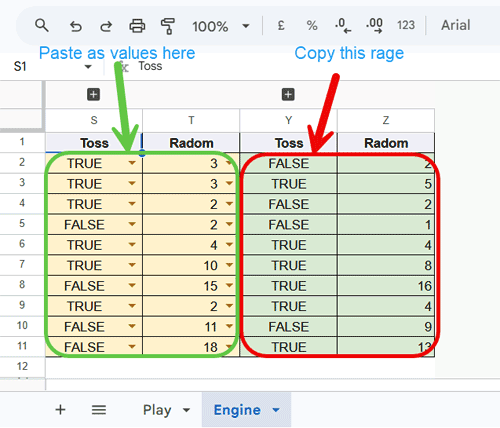
Engine Sheet
- Copy the range Y2:Z11 (Edit → Copy)
- Paste as values only into S2:T11 (Edit → Paste special → Values only)
Play Sheet
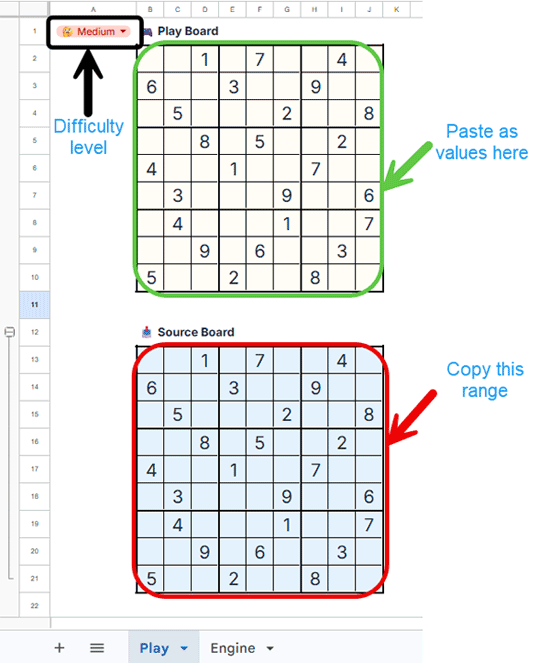
- Select a difficulty level from the drop-down in A1
Difficulty levels are tuned for enjoyable logical play. Hard mode offers a greater challenge, though puzzle difficulty can naturally vary from game to game. - Expand 📥 Source Board using the + button
- Copy the range B13:J21
- Paste as values only into the 🎮 Play Board starting at B2
- Start solving your new puzzle
- Expand ✅ Solution Board anytime to view the answer
- Repeat the same steps to generate another fresh game
Mobile Users
Note: The Google Sheets mobile app does not currently support “Paste Special > Values only.” To generate a new puzzle on a mobile device, please use the following workaround:
Engine Sheet
- Randomly select values from cells in S2:T11
Play Sheet
- Expand 📥 Source Board
- Manually enter the puzzle into the 🎮 Play Board
- Expand ✅ Solution Board to view the completed puzzle
- Repeat anytime for another game
If you are curious about how the engine works, continue reading below. Otherwise, skip ahead and start enjoying millions of fresh Sudoku games in Google Sheets.
SUDOKU Engine – Dynamic Google Sheets Sudoku Generator
This Google Sheets Sudoku template begins with a fully solved 9×9 Sudoku board (see B3:J11 in the Engine Sheet). The board is then transformed using multiple valid shuffling operations, while always preserving Sudoku rules.
This approach enables the system to generate millions of valid Sudoku board variations from a single base solution.
Shuffling a Fully Solved Sudoku Board
The core engine used to generate each new solved Sudoku layout is based on a single LET formula applied in the Play Sheet (cell B24).
=LET(
  data, Engine!B3:J11,
  bandIds, ARRAYFORMULA(ROUNDUP(SEQUENCE(9)/3)),
  swapErowBands, IF(Engine!S2, VSTACK(FILTER(data, bandIds=Engine!U2), FILTER(data, bandIds=Engine!V2), FILTER(data, bandIds=Engine!W2)), data),
  swapEcolStacks, IF(Engine!S3, HSTACK(FILTER(swapErowBands, TOROW(bandIds)=Engine!U3), FILTER(swapErowBands, TOROW(bandIds)=Engine!V3), FILTER(swapErowBands, TOROW(bandIds)=Engine!W3)), swapErowBands),
  mirrorFlip, IF(Engine!S4, IF(Engine!T4=1, CHOOSECOLS(swapEcolStacks, SEQUENCE(9, 1, -1, -1)), CHOOSEROWS(swapEcolStacks, SEQUENCE(9, 1, -1, -1))), swapEcolStacks),
  rNdeg, IF(Engine!S5, IF(Engine!T5=1, TRANSPOSE(CHOOSEROWS(mirrorFlip, SEQUENCE(9, 1, -1, -1))), IF(Engine!T5=2, CHOOSECOLS(CHOOSEROWS(mirrorFlip, SEQUENCE(9, 1, -1, -1)), SEQUENCE(9, 1, -1, -1)), TRANSPOSE(CHOOSECOLS(mirrorFlip, SEQUENCE(9, 1, -1, -1))))), mirrorFlip),
  swapRowBands, CHOOSEROWS(rNdeg, TOCOL(Engine!U6:W8)),
  swapcolStacks, CHOOSECOLS(swapRowBands, TOCOL(Engine!U9:W11)),
  swapcolStacks
)
Formula Breakdown
This formula applies two main transformation layers:
1. Dynamic Permutations (Structural Shuffling)
These operations rearrange the Sudoku grid while preserving all rules:
- swapErowBands → swaps row bands
- swapEcolStacks → swaps column stacks
- swapRowBands → shuffles rows within bands
- swapcolStacks → shuffles columns within stacks
2. Geometric Transformations (Matrix Operations)
These operations change the orientation of the entire grid:
- mirrorFlip → horizontal or vertical flip
- rNdeg → rotation (90°, 180°, 270°)
1. How Dynamic Permutations Work (Deep Dive)
A standard Sudoku grid is divided into:
- 3 Row Bands: (1–3), (4–6), (7–9)
- 3 Column Stacks: (1–3), (4–6), (7–9)
Instead of manually listing all combinations, a dynamic array formula is used in Engine!N3 to generate valid permutation sets.
=WRAPROWS(TOROW(
  BYROW(SEQUENCE(3, 3), LAMBDA(m, TOROW(
    REDUCE(TOCOL(, 3), m, LAMBDA(acc, x,
      VSTACK(acc, LET(r, FILTER(m, m<>x), VSTACK(HSTACK(x, r), HSTACK(x, INDEX(r, 2), INDEX(r, 1)))))
    ))
  )))
), 3)
How Shuffling is Controlled
In the Engine Sheet, column R contains the shuffle mode names:
- swapErowBands
- swapEcolStacks
- swapRowBands
- swapcolStacks
A TRUE/FALSE coin flip system (column Y) determines whether each shuffle mode is activated.
Randomization System
In column Z, each shuffle mode receives a randomized selector:
- swapErowBands →
RANDBETWEEN(1,6) - swapEcolStacks →
RANDBETWEEN(1,6) - swapRowBands →
RANDBETWEEN(1,18)(grouped ranges) - swapColStacks →
RANDBETWEEN(1,18)(grouped ranges)
Value Locking System
These values are then locked using:
Paste Special → Values Only (copying Y–Z to S–T)
This prevents recalculation and ensures the generated puzzle remains fixed.
Final Mapping Step
An XLOOKUP maps the stored values in column T to the correct permutation order, which is then applied to the Sudoku grid.
2. Geometric Transformations (Matrix Operations)
These transformations modify the entire Sudoku grid as a single matrix, without changing the underlying numbers or rules.
Unlike permutations (which rearrange rows and columns in structured groups), these operations transform the full board layout.
mirrorFlip (Grid Reflection)
This operation flips the entire Sudoku grid:
- Horizontal flip → reverses columns left to right
- Vertical flip → reverses rows top to bottom
This creates a mirrored version of the same valid Sudoku solution.
rNdeg (Grid Rotation)
This operation rotates the full grid:
- 90° rotation
- 180° rotation
- 270° rotation
All values remain valid Sudoku placements, only their positions change.
Control System (How Transformations Are Selected)
These transformations are applied conditionally using random selection:
RANDBETWEEN(1,2)→ decides flip directionRANDBETWEEN(1,3)→ selects rotation angle
If the transformation is disabled in the engine, the grid remains unchanged for that step.
Key Idea
Geometric transformations operate on the entire solved Sudoku grid at once, whereas permutations modify structured sub-sections (bands and stacks).
Both layers combine to significantly increase the number of valid puzzle variations generated from a single base solution.
Leaving Only the Clues (Masking System)
Once a shuffled solved board is generated, the playable puzzle is created using a binary masking system:
- 1 = show number
- 0 = hide number
There are three masked tables:
- Easy → B15:J23
- Medium → B27:J35
- Hard → B39:J47
The system selects one of these based on the user’s preference in cell A1 of the Play Sheet. The selected mask is also shuffled using the same board transformation logic to introduce variation.
The final mask application is handled by the formula in cell B51 of the Engine Sheet.
Final Puzzle Generation
The selected mask is multiplied with the solved Sudoku grid (Play!B13 – Source Board).
=ArrayFormula(LET(
  board, Play!B24:J32*Engine!B51:J59,
  IF(board=0,,board)
))
All 0 values are hidden, leaving only the visible clues.
This produces the final playable Sudoku puzzle.
Test Puzzle Uniqueness in Google Sheets (Optional Technical Validation)
Advanced users can verify puzzle uniqueness using an optional Apps Script.
Note: Most users do not need this step. The template is designed for smooth gameplay out of the box.
This script checks whether a puzzle has a single valid solution.
Apps Script Function
function CHECKSUDOKUUNIQUENESS(range) {
  const board = range.map(row =>
    row.map(cell => cell === "" ? 0 : Number(cell))
  );

  const solutions = countSolutions(board, 2);

  if (solutions === 0) return "Invalid";
  if (solutions === 1) return "Unique";
  return "Multiple";
}

function countSolutions(board, limit) {
  const empty = findBestEmptyCell(board);
  if (!empty) return 1;

  const [row, col, candidates] = empty;
  let total = 0;

  for (let num of candidates) {
    board[row][col] = num;
    total += countSolutions(board, limit);
    board[row][col] = 0;

    if (total >= limit) return total;
  }

  return total;
}

function findBestEmptyCell(board) {
  let best = null;

  for (let r = 0; r < 9; r++) {
    for (let c = 0; c < 9; c++) {
      if (board[r][c] === 0) {
        const cand = getCandidates(board, r, c);

        if (cand.length === 0) return [r, c, []];

        if (!best || cand.length < best[2].length) {
          best = [r, c, cand];
        }
      }
    }
  }

  return best;
}

function getCandidates(board, row, col) {
  const used = new Set();

  for (let i = 0; i < 9; i++) {
    used.add(board[row][i]);
    used.add(board[i][col]);
  }

  const br = Math.floor(row / 3) * 3;
  const bc = Math.floor(col / 3) * 3;

  for (let r = br; r < br + 3; r++) {
    for (let c = bc; c < bc + 3; c++) {
      used.add(board[r][c]);
    }
  }

  let out = [];
  for (let n = 1; n <= 9; n++) {
    if (!used.has(n)) out.push(n);
  }

  return out;
}
Usage in Sheet
Use the function in Google Sheets like this:
=CHECKSUDOKUUNIQUENESS(B13:J21)FAQ
Can this Sudoku template generate unlimited puzzles?
Yes. It can generate large number of valid Sudoku boards using dynamic transformations and masking logic.
Does it work on mobile?
Yes, but desktop is recommended due to limited “Paste Special” functionality on mobile devices.
Are the puzzles always unique?
The generator is designed and tested to generally produce puzzles with a single solution, though results may vary depending on the generated configuration.
Final Thoughts
This free Google Sheets Sudoku template is designed for dynamic gameplay, offering a new puzzle experience every time you generate a board.
With its combination of:
- matrix-based shuffling
- transformation logic
- difficulty-based masking
it functions as a fully dynamic Sudoku generator inside Google Sheets.
Whether you’re looking to play Sudoku in Google Sheets or explore how a spreadsheet-based puzzle engine works, this template provides a flexible and powerful solution.
If you’re interested in similar automated tools, you can also explore our Premium & Free Google Sheets Templates (Fully Automated & Dynamic).
