
















Sorting rows in Excel typically refers to rearranging entire datasets based on values in a specific column or row. But what if you want to sort each row individually in Excel, from left to right? While Excel doesn’t offer a built-in feature for this, the power of LAMBDA functions and dynamic arrays makes it possible to perform this operation with a single formula.
In this tutorial, you’ll learn how to sort each row individually in Excel—whether in ascending or descending order—using a flexible LAMBDA-based formula. This technique is especially useful when dealing with row-wise scores, timelines, or customized data transformations, and it requires no helper columns or manual sorting.
Formula to Sort Each Row Individually in Excel
=LET(
   range, array,
   DROP(
      REDUCE("", SEQUENCE(ROWS(range)), LAMBDA(acc, seq, VSTACK(acc, SORT(CHOOSEROWS(range, seq), 1, -1, TRUE)))), 1
   )
)
Replace array with your actual data range.
Example Dataset
Here’s a real-life dataset where sorting each row individually in Excel can be helpful—for example, analyzing monthly production figures for different fruits, highlighting each fruit’s production from highest to lowest:
| Product | Jan | Feb | Mar | Apr | May |
| Apple | 120 | 95 | 130 | 110 | 125 |
| Mango | 85 | 105 | 100 | 115 | 90 |
| Blue Berry | 140 | 135 | 120 | 125 | 150 |
The following formula sorts each product’s monthly production values in descending order:
=LET(
   range, B2:F4,
   DROP(
      REDUCE("", SEQUENCE(ROWS(range)), LAMBDA(acc, seq, VSTACK(acc, SORT(CHOOSEROWS(range, seq), 1, -1, TRUE)))), 1
   )
)
To include product names in the result, use the HSTACK function:
=HSTACK(A2:A4, <above_formula>)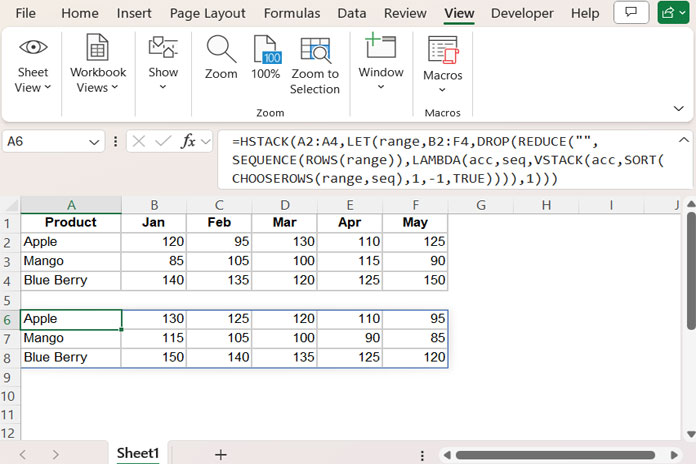
Formula Explanation
SORT(CHOOSEROWS(range, seq), 1, -1, TRUE)sorts one row (specified byseq) from left to right in descending order.CHOOSEROWS(range, seq)extracts theseq-th row from the data range.
VSTACK(acc, ...)appends the sorted row vertically to the result accumulator.REDUCE("", SEQUENCE(ROWS(range)), LAMBDA(acc, seq, ...))iterates through each row index and builds the final sorted array.DROP(..., 1)removes the initial empty element introduced by REDUCE.
This approach lets you sort each row individually in Excel without manual intervention.
Frequently Asked Questions
Can I sort rows horizontally in Excel using a formula?
Yes. While Excel doesn’t have a built-in command for this, you can use a combination of LAMBDA, SORT, and dynamic array functions to sort each row individually from left to right. For a single row, the SORT function with its last argument set to TRUE can sort across columns. (Syntax: SORT(array, [sort_index], [sort_order], [by_col]))
Which Excel versions support sorting each row with this formula?
This method requires Excel 365 or Excel 2021+, which support LAMBDA, SORT, REDUCE, SEQUENCE, and other dynamic array functions.
Can I sort each row in ascending order instead?
Yes. Change the sort_order from -1 to 1 in the formula to sort from lowest to highest.
Resources
- Custom Sort in Excel (Using Command and Formula)
- SORT and SORTBY – Excel vs Google Sheets
- Sort Data but Keep Blank Rows in Excel and Google Sheets
- Hierarchical Number Sorting in Excel with Modern Functions
- Sort Names by Last Name in Excel Without Helper Columns
- Sort by Field Labels Using the SORT and XMATCH Combo in Excel
