

You don’t need to be a website expert to run a blog or website. Many bloggers hire outside help to maintain their sites, so don’t panic if you encounter errors like “Not Acceptable! This Error was Generated by Mod_Security – Solve WordPress Login Issue.”
Bloggers who generate substantial organic traffic often rely on their websites as their profession or livelihood. Naturally, seeing any login error can cause panic.
In this post, we’ll discuss one common issue: the WordPress Mod_Security login error.
What is a WordPress Mod_Security Login Error?
When you try to log in to your WordPress dashboard, such as:
https://www.yoursite.com/wp-login.phpyou may see the following error:
Not Acceptable!

An appropriate representation of the requested resource could not be found on this server. This error was generated by Mod_Security.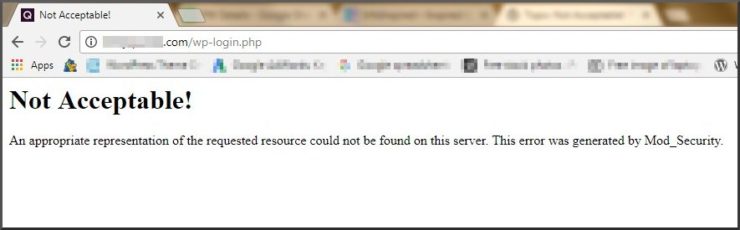
This screenshot shows what the error looks like.
The site itself remains live and fully functional. The only issue is that you cannot access your WordPress admin panel, meaning you cannot add new content, update plugins, or make any changes.
What Causes ModSecurity Errors?
A ModSecurity WordPress login error is a server-side security feature designed to prevent potential threats, such as brute-force attacks.
Your IP address may be temporarily flagged as a risk, preventing login attempts.
If you host multiple websites on the same account, all of them may be affected by this ModSecurity restriction.
How to Fix the Mod_Security Error on WordPress
The easiest and safest way to resolve a Mod_Security WordPress login error is to contact your hosting provider. They can quickly identify the issue and remove the restriction.
For example, I experienced this error after installing the Jetpack plugin, which connects a self-hosted WordPress.org site to WordPress.com for performance improvements.
After contacting my hosting provider, HostGator, they resolved the issue quickly by lifting the restriction on their end. I was then able to log in to my WordPress dashboard without further problems.
If you use a different hosting provider, simply explain the issue. Most providers can resolve it within minutes. If they are unresponsive, consider switching to a hosting provider that offers better support.
Tips to Prevent Mod_Security WordPress Login Errors
To reduce the chances of encountering ModSecurity login issues in the future:
- Keep your WordPress core, themes, and plugins up to date.
- Use strong passwords for your WordPress dashboard and FTP accounts.
- Install a security plugin, such as Wordfence, to limit login attempts and whitelist your IP.
- Avoid logging in to your dashboard on multiple browser tabs simultaneously.
By following these steps, you can minimize disruptions caused by Mod_Security WordPress login errors and ensure smooth access to your admin panel.

I have an account with Hostgator and I am encountering the same ModSecurity issue on one of my websites I did contact the customer service (technical support) but they can do nothing about it, its bad that there is no ModSecurity setting in CPanel otherwise I would do something from my end 🙁
Hi, Nik,
As far as I know, the only way to solve the error is to white-list this rule on the server. Please contact their 24/7 support again (this time maybe a different department other than ‘technical’).
Also, search Google for more resources.
Best,