
Turning off chat is one of the privacy features on Facebook and Messenger. It lets a user hide their green dot (active now) or last active time, giving the appearance of being offline even when they’re online.
This is not the same as blocking someone from messaging or calling. Blocking is much stricter. Here, we’re only talking about turning off active status — the “milder” version.
If you suspect that someone close to you has turned off chat with you, it can feel uncomfortable. You can’t see their online presence and that may create some awkwardness.
👉 On the flip side, when you turn off chat for someone, remember they may feel the same.
How Does Active Status Work on Facebook?
Let’s say one of your contacts frequently messages you every time you come online. To avoid constant pings, you can turn off your active status for that person. Once you do, they won’t see your green dot or “recently active” time — even if you’re browsing Facebook or Messenger.
Turn Active Status ON or OFF (Facebook Desktop – 2025 Settings)
- Sign in to your Facebook account on a desktop browser.
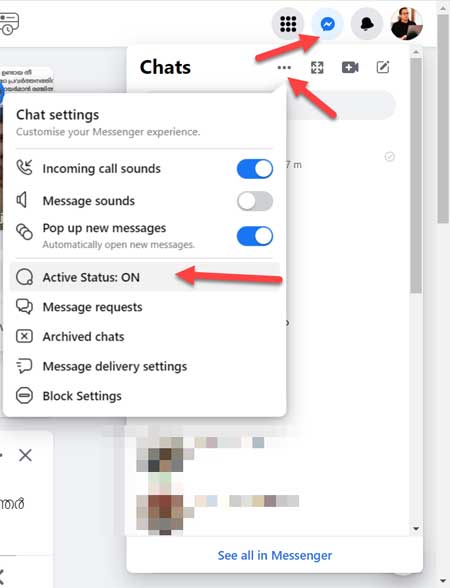
- Click on the Messenger icon.
- Select the three horizontal dots (More options).
- Choose Active Status → then decide whether to:
- Turn it off for all contacts, or
- Turn it off for specific contacts.
Note: Turning off your Active Status in one app (e.g., Facebook on desktop) doesn’t automatically turn it off in other apps (e.g., Messenger on your phone). To remain fully invisible, you need to turn off Active Status wherever you use Facebook or Messenger.
Can You Find Out Who Turned Off Chat With You on Facebook?
This is the big question. And the honest answer is: there’s no direct way. Facebook does not allow users to see who has hidden their active status from them.
No plugins, scripts, or third-party apps can reliably do this. Most such tools don’t work and often disappear after Facebook updates.
But there are a few indirect clues.
Tips to Guess If Someone Has Turned Off Chat With You
While not 100% accurate, these tricks may give you hints:
- Check their activity: If they’re posting, liking, or commenting but always appear offline to you, they may have hidden their status.
- Sudden change: If they used to appear online frequently and now they’re always offline, they might have turned off active status (for you or for everyone).
- Device difference: Sometimes people disable chat only on desktop but remain active on mobile. You may still see “Active now” or “Recently active” from another device.
- Response speed: If you message them and they reply instantly while showing offline, it’s a clue they’ve hidden their active status.
- Check from another account: If you have a mutual friend willing to check, see whether that person shows as active there. If yes, but not on yours, then it’s likely they turned it off just for you.
Final Thoughts on Facebook Chat Privacy
There is no guaranteed way to find out who has turned off chat with you on Facebook or Messenger. The privacy setting is designed that way. You can only make an educated guess using the clues above.
Remember: hiding active status doesn’t always mean something negative. Sometimes people just want fewer interruptions.