
Do you want to space out data by inserting a specific number of empty cells between values in Excel? For example, adding 10 blank cells between a list of names? This tutorial will guide you through a dynamic array formula that automatically inserts N empty cells between values in a column. The method can also be adjusted for rows with minor modifications. The formula does not use complex functions or LAMBDA functions, ensuring fast performance.
Understanding the Goal
We want to take a single-column dataset and insert a specified number (N) of blank cells between each value dynamically, without manually inserting rows. This method ensures that updates to the original data are reflected immediately in the output.
Assume you have a list of names in A2:A5 as follows:
Marco
Sherry
Rachelle
Warren
If N = 2, the output should be:
Marco
(blank)
(blank)
Sherry
(blank)
(blank)
Rachelle
(blank)
(blank)
Warren
(blank)
(blank)
You can use the formula in cell C2 after specifying N in cell C1. Let’s proceed with the step-by-step instructions, followed by the formula explanation.
Step 1: Define the Inputs
- Original Data Range – Assume your data is in A2:A5.
- Number of Empty Cells (N) – Enter the number of blank cells to insert (e.g., in C1).
Here, I am entering 2 in cell C1. You can enter any number starting from 1, depending on your requirement.
Step 2: Construct the Dynamic Array Formula
In cell C2, enter the following formula to generate the spaced-out data dynamically:
=IFNA(TOCOL(HSTACK(TOCOL(A2:A5, 3), T(SEQUENCE(1, C1)))), "")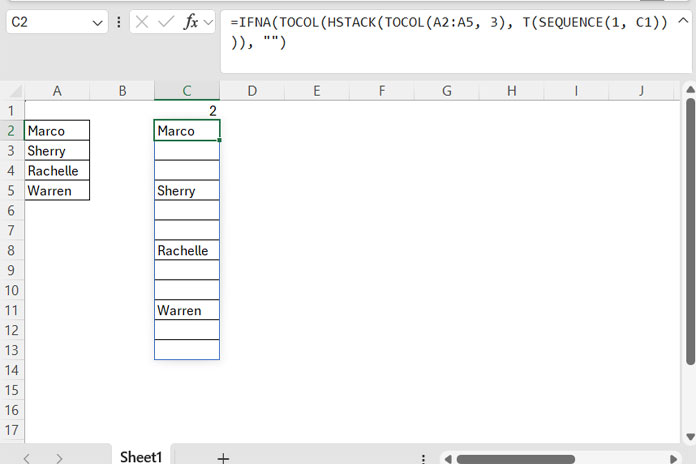
How It Works:
TOCOL(A2:A5, 3): Removes empty cells in the range A2:A5.T(SEQUENCE(1, C1)): TheSEQUENCEfunction generates numbers in a row based on the number specified in C1. TheTfunction returns empty cells equal to the number of generated sequence numbers.HSTACK(TOCOL(A2:A5, 3),T(SEQUENCE(1, C1))): Stacks the original list with the generated empty cells, forming a 2D array where the first column contains the original values, and the next columns contain empty cells or#N/Aerrors.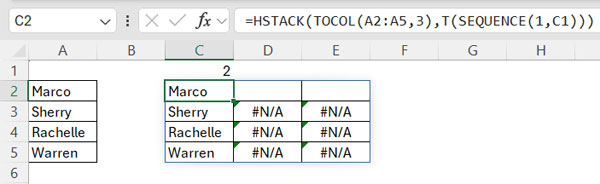
TOCOL(...): Converts the 2D array into a single column, placing the values and empty cells or errors in sequence.IFNA(...): Replaces any#N/Aerrors with blank cells.
Step 3: Adjusting for Rows Instead of Columns
If you want to insert empty cells between values in a row (e.g., B1:E1), instead of a column, modify the formula as follows:
=IFNA(TOROW(HSTACK(TOCOL(B1:E1, 3), T(SEQUENCE(1, B3)))), "")Where N is specified in B3.
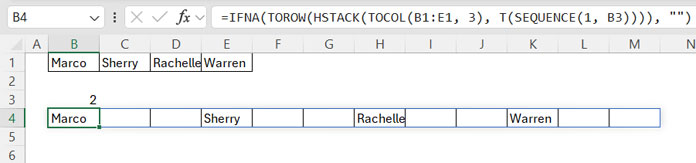
Key Change: We replace the outer TOCOL with TOROW to ensure the output remains in a row format instead of a column.
Conclusion
This dynamic array formula provides an efficient way to insert N empty cells between values without manually adjusting the spreadsheet. It updates automatically as your data changes, making it ideal for large datasets or frequently updated lists.